Python GUI with Tkinter
Installing Tkinter
fabgt@fabgt-SAT:~$ sudo apt-get install python3-tk
Hello World!
#!/usr/bin/env python3

from tkinter import *

root = Tk()

#Creating a label widget
my_label = Label(root, text="Hello World!")
#Shoving it onto the screen
my_label.pack()

root.mainloop()
Positioning with the Grid System
#!/usr/bin/env python3

from tkinter import *

root = Tk()

#Creating a label widget
myLabel1 = Label(root, text="Hello World!")
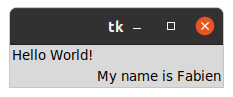
myLabel2 = Label(root, text="My name is Fabien")
#Shoving it onto the screen
myLabel1.grid(row=0, column=0)
myLabel2.grid(row=1, column=1)

root.mainloop()
Result: