Setting up Serial Com with Minicom
Linux offers various tools and commands to access serial ports.
Note
Linux uses ttySx for a serial port device name. For example, COM1 (DOS/Windows name) is ttyS0, COM2 is ttyS1, and so on. USB based serial ports might use a name such as ttySUSB0. All these devices are located under /dev/ directory.
Finding serial devices
Find serial devices connected to the computer with dmesg | grep tty.
fabgt@fabgt-SAT:~$ dmesg | grep tty
[429410.350184] cdc_acm 2-1:1.0: ttyACM0: USB ACM device
[460754.657500] cdc_acm 2-1:1.0: ttyACM0: USB ACM device
[505525.031516] cdc_acm 2-1:1.0: ttyACM0: USB ACM device
[512119.588181] usb 2-2: cp210x converter now attached to ttyUSB0
Change permission on usb devices
fabgt@fabgt-SAT:~$ sudo chmod 777 /dev/ttyUSB0
Getting started with minicom
First check with dmesg | grep tty if system recognize your adapter. Then try to run minicom with sudo minicom -s, go to “Serial port setup” and change the first line to /dev/ttyUSB0.
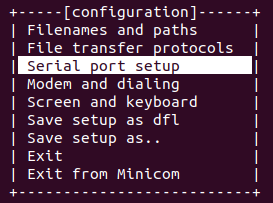
Don’t forget to save config as default with “Save setup as dfl”.
