Remote SSH access with Cloudflare
Prerequisites
An existing Active Tunnel, configured either from the host or the Cloudflare dashboard.
Note
The Tunnel configuration has been migrated from the host to the Cloudflare Zero Trust Dahsboard.
source: https://www.youtube.com/watch?v=fNSf7D8CXgA
1. Create a new Public Hostname with the SSH protocol
In the Dashboard (Zero Trust > Networks > Tunnels), add a new Public Hostname and specify subdomain, domain, protocol, address and port to the host.
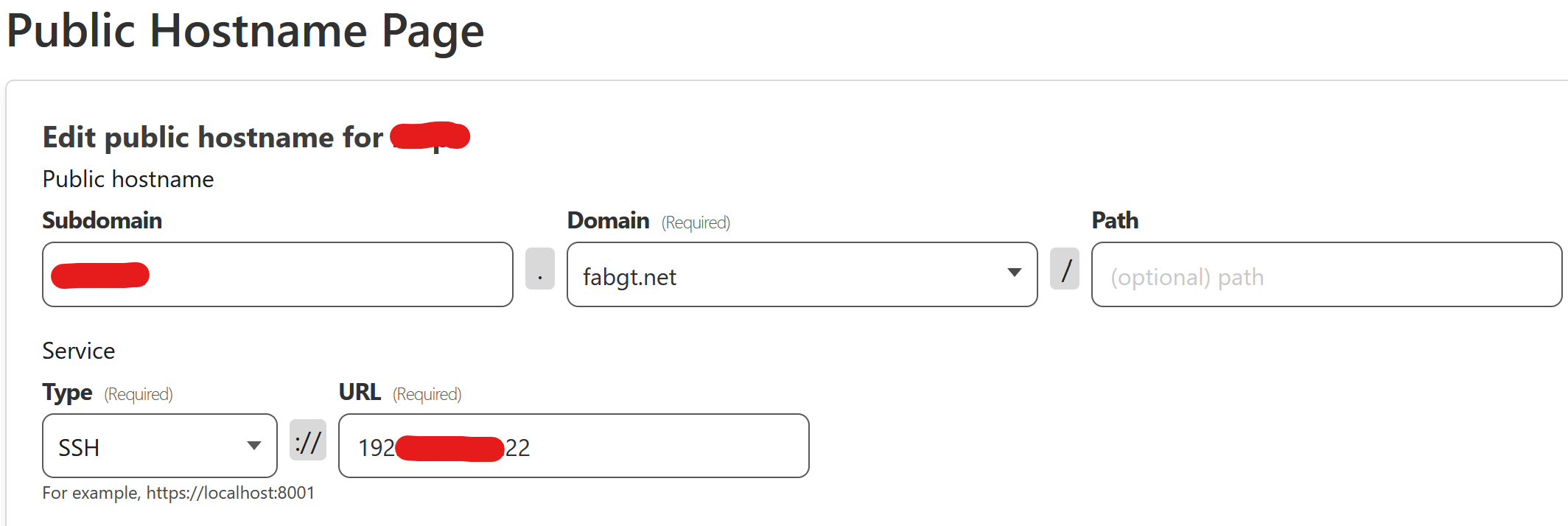
2 . Configure the host to accept ssh request through Cloudflare
Type the following:
cloudflared access ssh-config --hostname <subdomain.domain>
Instructions will show up:
Add to your /home/user/.ssh/config

Host subdomain.domain
    ProxyCommand /usr/local/bin/cloudflared access ssh --hostname %h
Use any text editor to add this text to /home/user/.ssh/config.
3 . Connect to the host from itself and add the public key
Use the subdomain and domain in the command. Type yes to add the public
ssh [email protected]
The autenticity of host 'subdomain.domain' ....
Are you sure you want to continue connecting (yes/no/[fingerprint])?
Log onto the host by using the prefered authentication method.
4 . Use the PUTTY client to connect to the host from anywhere
In tab Connection > Proxy:
select Local as Proxy type
modify the Telnet command as follows:
cloudflared access ssh -hostname %host
In tab Session:
use subdomain.domain as Host Name
for Connection type, select SSH
Finally, Click Open and authenticate.